Essential Tools for Planning Your Astrophotography Sessions
Planning an astrophotography session takes more than grabbing your camera when the sky looks clear. You need the right tools to know when the Milky Way will be visible, what the weather will do, and where to find dark skies. This guide covers the apps and resources I use for planning, visualization, weather forecasting, and finding dark sky locations.
Planning an astrophotography session takes more than grabbing your camera when the sky looks clear. You need the right tools to know when the Milky Way will be visible, what the weather will do, and where to find dark skies. This guide covers the apps and resources I use for planning, visualization, weather forecasting, and finding dark sky locations.
Several tools exist to help with this. Below, I've broken them into four categories: planning, visualization, weather, and light pollution.
Planning Tools
Planning tools answer basic questions. When will the galactic core be visible at my location? What time does astronomical twilight end? When should I leave the house?
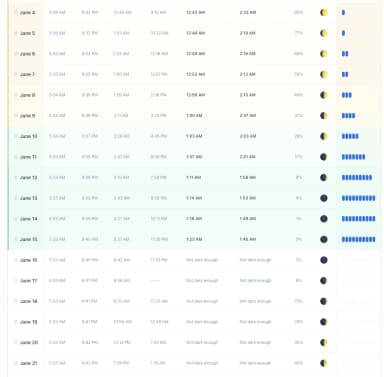
- I built MilkyWayPlanner.com because I got tired of clicking through dates one at a time in other apps. My tool shows your shooting windows for months at a time on a single screen. You can view an entire season of Milky Way visibility at your location without the tedious process of checking each date individually. The tool displays sunrise and sunset times, moon phases, and when the galactic core will be above the horizon. This makes planning trips weeks or months ahead straightforward.
- PhotoPills ($9.99, iOS/Android) packs a lot into one app. It includes an ephemeris showing the positions of the Sun, Moon, and Milky Way for any date and location. You also get depth of field calculators, time-lapse tools, and star trails calculators. Many astrophotographers consider it an essential tool. For advance planning, you still need to tap through dates one at a time to check conditions, but the app handles most other planning tasks well.
- Planit Pro (around $10, iOS and Android) offers features similar to PhotoPills but has a different interface. Some photographers prefer how it presents information. Like PhotoPills, it requires manually stepping through dates when viewing future sessions.
- Stellarium works for basic planning and 'seeing' the night sky. You can set any date and time to see where the Milky Way will appear. The desktop version is free, and there's a web version as well. The mobile app costs a few dollars. For checking specific dates, it does the job, though it lacks the seasonal overview that dedicated planning tools provide.
Visualization Tools
Visualization tools help you see what the night sky will look like and plan compositions before you arrive.
- PhotoPills includes an augmented reality mode that overlays the predicted Milky Way position onto your camera view. You can scout locations during the day and see where the galactic core will appear at night. This feature alone justifies the price for many photographers.
- Stellarium shows you exactly what the night sky will look like from any location at any time. The desktop version includes a framing feature where you input your camera and lens specifications to see your actual field of view. This helps you plan compositions and figure out what focal length you need.
- Telescopius is a free web-based tool built for deep-sky object planning. You input your telescope or camera lens specs, and it shows how objects will appear with your equipment. The mosaic planning tool helps when capturing objects larger than your field of view. While it targets deep-sky imaging more than Milky Way photography, the equipment simulation features work for any astrophotography planning.
- Planit Pro also includes AR visualization similar to PhotoPills. The choice between these apps often comes down to which interface you prefer.
Weather Tools
Clear skies matter more than almost anything else. Perfect timing and a great location mean nothing if clouds roll in. These tools help you predict conditions before committing to a long drive.
- Astrospheric is what many North American astrophotographers use for weather. It pulls data from the Canadian Meteorological Centre, which is updated every six hours, and provides forecasts designed explicitly for astronomy. The app shows cloud cover at different altitudes, atmospheric transparency, seeing conditions, and smoke forecasts during wildfire season. The free version covers the basics, while the Pro subscription adds ensemble cloud forecasts, weather alerts, and aurora predictions via the Kp index. You get 84-hour hourly forecasts, enough lead time to plan a session.
- Clear Outside provides a simpler view of cloud-cover predictions, breaking them into low-, medium-, and high-altitude layers. It works well alongside Astrospheric. Checking multiple weather sources improves your odds of an accurate forecast, and Clear Outside uses a different model that sometimes catches what others miss.
- Scope Nights (iOS, paid) provides astronomy-specific weather forecasts with long-range predictions up to 10 nights ahead. This helps when picking the best night during an upcoming trip. The app also includes a dark sky site finder with light pollution maps. It pulls data from the UK Met Office and US NOAA.
No single weather app gets it right every time. Experienced astrophotographers check two or three sources and look at satellite imagery as their shooting window approaches. Recheck conditions the day of your planned session. The models improve as you get closer to your target date.
Light Pollution Resources
Dark skies separate good images from great ones. These resources help you locate dark sites and understand conditions at different locations. Our lesson on finding dark skies covers how to evaluate sites beyond just checking a map. Check out our resources page for additional gear and photographer recommendations.
- Dark Site Finder provides an interactive map showing light pollution levels based on 2022 satellite data. You can zoom in on any area to see relative darkness levels. The color-coded overlay makes it easy to identify nearby dark locations and estimate driving distances to escape urban light domes.
- Light Pollution Map shows similar information with additional data. You can view Bortle scale ratings, Sky Quality Meter values, and the locations of designated dark sky parks and reserves.
- DarkSky International certifies dark sky locations worldwide, including sanctuaries, reserves, and parks that meet strict lighting standards. Their database helps you find places where light pollution is actively managed. Planning a trip to a certified dark sky location often produces better results than finding a random dark spot on a map.
Putting It All Together
Here's how I use these tools throughout the planning process.
Weeks or Months Out: Finding Good Dates
I start with MilkyWayPlanner.com to scan the coming months. I'm looking for nights when the moon sets early or rises late, and when the galactic core is above the horizon during dark hours. Because I can see an entire season at once, I can quickly spot the best windows and block them on my calendar. This takes five minutes instead of clicking through 30 or 60 individual dates.
If I'm planning a trip to a new area, I'll also check light pollution maps at this stage. I want to know how far I need to drive from my hotel or campsite to reach dark skies. Dark Site Finder and Light Pollution Map help me pick a base location that puts me within a reasonable distance of good shooting spots.
One to Two Weeks Out: Location Scouting and Composition Planning
Once I have the dates locked in, I switch to visualization tools. I use PhotoPills or Stellarium to see exactly where the Milky Way will appear at my chosen location and time. This helps me answer specific questions:
- Will the galactic core rise over that mountain ridge?
- What time will it be positioned above the old barn I want to shoot?
- Exactly where in the sky will the Milky Way Core be?
I always try to scout the location during the day, then use PhotoPills' AR mode to stand in my planned shooting spot and see where the Milky Way will appear that night. This prevents the frustrating experience of showing up and realizing the composition doesn't work.
For deep-sky targets, I'll check Telescopius to see how objects will appear with my specific equipment and plan any mosaics I want to capture.
Three to Five Days Out: Weather Monitoring Begins
This is when I start watching Astrospheric. The forecasts this far out aren't perfect, but they give me a general sense of whether the night looks promising or if I should have a backup date ready.
I check the app once or twice a day to see if the forecast is trending better or worse. If multiple days look similar, the weather forecast often determines which one I commit to.
Day Before and Day Of: Final Weather Checks
The day before my shoot, I check Astrospheric and Clear Outside multiple times. I'm looking for agreement between the models. If both show clear skies, I feel confident. If they disagree, I dig deeper.
On the day of the shoot, I add satellite imagery to my checks. Actual cloud positions tell you more than any forecast. I look at current conditions and animated loops to see which direction the weather is moving.
I make a go/no-go decision a few hours before I need to leave. There's no point driving two hours if the probability of clouds rolling in is high.
On Location: Final Adjustments
Once I arrive, I use PhotoPills AR mode one more time to confirm my composition. Even with careful planning, small adjustments often occur once you're in the field with your tripod.
If conditions change during the night, weather apps help me decide whether to wait out passing clouds or pack up early (assuming I have cell phone coverage).
The Short Version
- Weeks/months out: MilkyWayPlanner.com for dates, light pollution maps for locations
- One to two weeks out: PhotoPills, Stellarium, or Planit Pro for composition planning
- Three to five days out: Start monitoring Astrospheric
- Day before and day of: Check Astrospheric and Clear Outside repeatedly, add satellite imagery
- On location: AR tools for final composition checks
Each tool serves a different stage of the process. You don't need all of them, but using the right tool at the right time helps you plan better and waste fewer nights chasing clouds. For a look at how one photographer used these tools to plan a shoot two years ahead, read our Iceland case study. And if you are new to astrophotography, start with our beginner's guide.