Plan Your Entire Astrophotography Season: New Features for Milky Way, Moon, and Trip Planning
MilkyWayPlanner.com now includes a free annual calendar generator, moon planning tools, and a multi-stop trip planner. See your entire shooting season at a glance.
I built MilkyWayPlanner.com because I was tired of clicking through dates one at a time in other apps. That core idea has not changed. What has changed is how much you can now do with the tool.
This post walks through everything available on the site, from the free annual calendar to the premium planning features. If you have been using the basic Milky Way planner, there is much more available now.
The Problem This Solves
Most astrophotography planning apps make you check conditions one date at a time. Want to know the best nights in March? Click through 31 dates. Planning a trip three months out? Click through 90 dates. Trying to find the best weekend across an entire season? Good luck.
This approach works fine if you are planning for tomorrow night. It falls apart when you need to see the bigger picture.
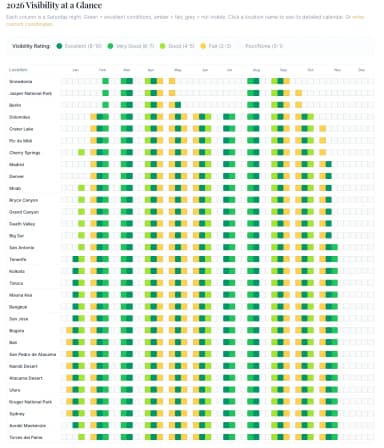
MilkyWayPlanner.com shows you months of data on a single screen. You can scan an entire season in seconds and identify your best shooting windows without the tedious date-by-date process.
Free Annual Milky Way Calendar
The free calendar tool lets anyone create a personalized, full-year Milky Way photography calendar for any location in the world.
How it works
- Enter your location. Search for any place globally, whether that is a dark sky park, a national park, or your backyard.
- Select your year. Plan ahead through 2029.
- Enter your email. One field, no spam, unsubscribe anytime.
- Get your calendar instantly.
What you see
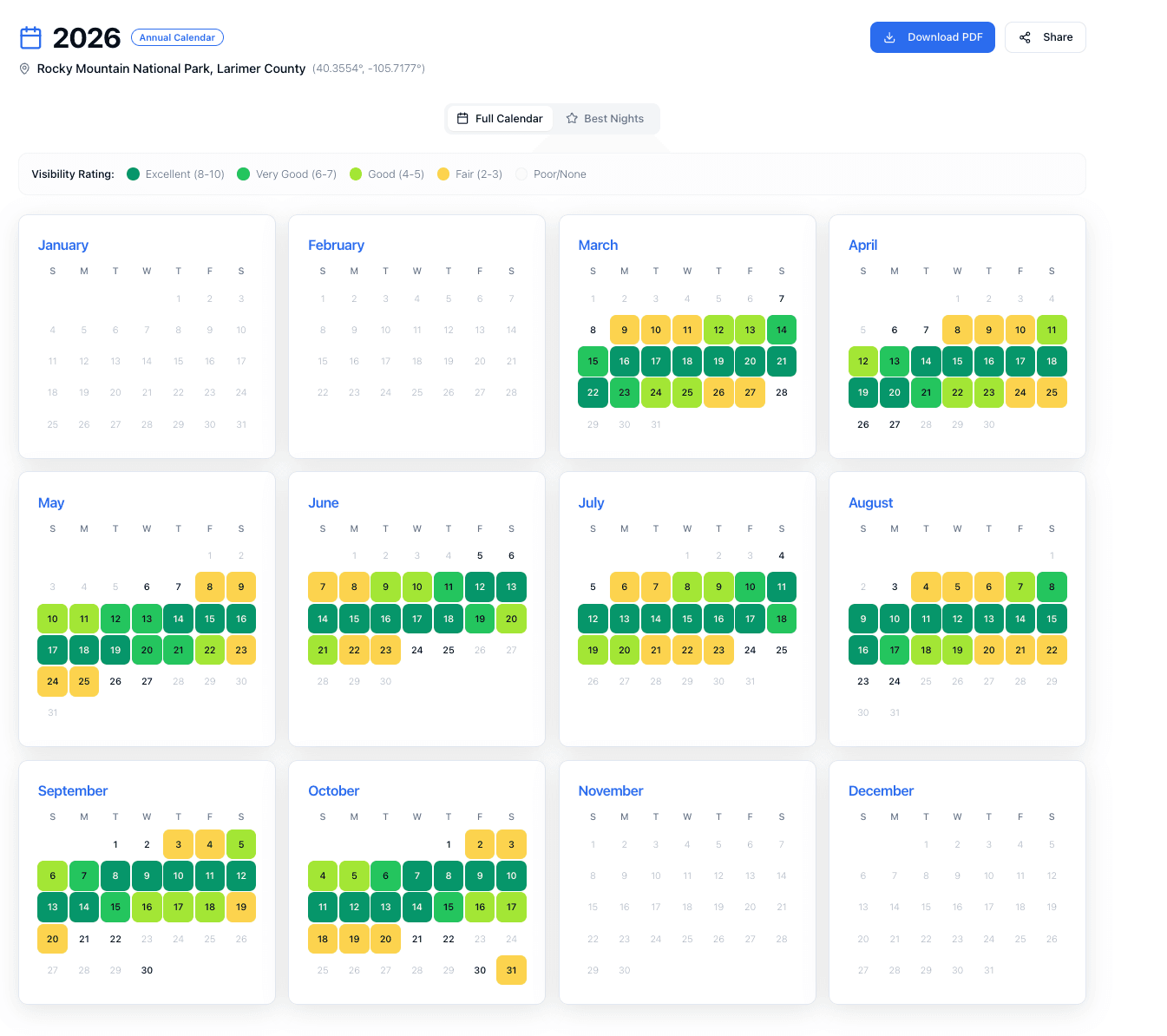
The calendar displays a 12-month grid with color-coded days showing visibility ratings. Green days indicate excellent conditions with dark, moonless skies. Yellow days show fair conditions. Gray days mean poor or no visibility.
Below the calendar grid, a detailed table breaks down the best nights with exact data: sunrise and sunset times, moonrise and moonset times, galactic core visibility windows, moon phase percentages, and overall visibility ratings.
You can see an example here: Rocky Mountain National Park 2026 Milky Way Calendar
Sharing and downloads
Each calendar gets a unique URL you can share with friends or photography groups. You can also download a branded PDF to print and take into the field.
The calendar is free. Creating one requires an email signup that will send occasional updates on astrophotography planning. You can unsubscribe anytime.
Shareable Monthly Plans
Beyond annual calendars, you can share specific monthly Milky Way plans with detailed astronomical data.
When you share a monthly plan on social media, a custom preview image generates automatically showing your location, best nights, visibility ratings, and moon phases. This makes it easy to coordinate group outings or share conditions with your photography community.
You can also download planning cards as images or export the raw data as CSV files for spreadsheet analysis.
Moon Planner (Premium)
Moon photography requires different data than Milky Way shooting. The Moon Planner provides what you need for capturing moonrises, moonsets, and supermoons.
What you get
Precise moonrise and moonset times with compass directions for rise and set. Moon phase percentages and names. Illumination levels throughout the month.
The planner identifies all supermoon dates for the year and highlights the best opportunities for dramatic moon shots.
Twilight data shows civil, nautical, and astronomical twilight times. This helps you plan shots where the moon appears against colorful twilight skies rather than full darkness.
Export options
Download complete moon data as an Excel spreadsheet. Sync moon events directly to Google Calendar, Apple Calendar, or Outlook using ICS export.
Trip Planner (Premium)
The Trip Planner handles multi-stop astrophotography road trips and expeditions.
Building your itinerary
Create a trip and name it. Add stops by selecting from your saved favorite locations, choosing from preset dark sky destinations, or searching for any custom location. Assign specific dates to each stop.
The planner shows Milky Way and moon conditions for each stop during your planned travel dates. You see visibility data only for the nights you will actually be at each location.
Features
A vertical timeline view displays your journey through each stop. Drag and drop to reorder your itinerary. Add notes to each stop for equipment reminders or scouting information.
New locations added to trips automatically save to your favorites for future use.
Exports
Download your complete trip itinerary with all astronomical data as an Excel file. Sync your entire trip to your calendar app with all stops and optimal shooting times included.
All trip data stays private. Row-level security means only you can view and edit your itineraries.
The Planning Hub Dashboard
Premium subscribers access a unified Planning Hub with three dedicated sections.
Milky Way Planner: Save unlimited favorite locations. View monthly and yearly calendars. Export to Excel and ICS. Share calendars with unique URLs.
Moon Planner: Location-based moon data and calculations. Supermoon highlights. Full export functionality.
Trip Planner: Multi-stop itinerary building. Date-specific visibility data. Complete trip exports.
The hub includes location management for saving dark sky spots, quick access to popular destinations, and custom search for anywhere in the world. Coordinates display for GPS navigation when you need precise location data.
Free vs Premium
Free users get
- Create and share annual calendars with email signup
- View monthly Milky Way visibility data
- Basic location search
- Shareable calendar links
Premium subscribers ($25/year) get
- Everything above plus
- Moon Planner with rise/set directions and supermoon tracking
- Trip Planner for multi-stop expeditions
- Unlimited saved locations
- Excel exports with complete astronomical data
- Calendar sync via ICS for all planners
- No newsletter popups
- Priority support
Data Accuracy
All calculations use astronomical algorithms for precise results. Moon phases calculate to exact illumination percentages. Galactic core visibility accounts for astronomical twilight, galactic center altitude, and your specific coordinates.
The goal is giving you data you can trust when planning sessions weeks or months ahead. Understanding how latitude affects your season helps you interpret these numbers for your specific location.
Getting Started
If you have not tried the free annual calendar, start there (on the home page). Enter your location, pick your year, and see your entire Milky Way season on one screen. It takes less than a minute. Our lesson on planning your first shoot shows how to use these tools step by step.
If you are ready for moon planning, trip building, and full export capabilities, the premium subscription gives you access to everything for less than the cost of a single tank of gas to reach a dark sky site.
Questions or feature requests? Use the contact form or reach out directly. I read everything and use feedback to improve the tool. For a deep dive into how these tools fit into your workflow, read our essential planning tools guide.